ChatGPT's Business Hub counts the times you're mentioned. The insights OpenAI lists don't include the questions you lose.
OpenAI's Business Hub lets brands claim their ChatGPT profile and see mentions. Here's what it shows, what its insights leave out, and what to set up now.
 Citable Team
Contents
TL;DR
- OpenAI's Business Hub (beta) lets a business claim its profile in ChatGPT, update its details, add product feeds with pricing and availability, and see aggregated mentions, website clicks and discovery topics.
- Those insights start from your business already showing up in ChatGPT. None of the insights OpenAI lists covers a question where ChatGPT names a competitor and not you.
- A Business Agent is reached from your profile, which people open when your business appears in an answer, or from a sponsored placement. In the route OpenAI describes, being named comes first.
What OpenAI launched
OpenAI introduced Businesses in ChatGPT in beta, describing it as a new way for businesses to connect with "the 1.2 billion people who use ChatGPT each week." It has two parts.
Business Hub. A business claims its organization in ChatGPT. Once verified, it can update key details and add self-service product feeds with pricing and availability. Any eligible business located where ChatGPT is available can claim. Shopify merchants can connect their store from Business Hub or from the Shopify admin, and OpenAI says eligible Shopify products are already in ChatGPT through Shopify Catalog.
Business Agents. After claiming, eligible businesses can build, test and launch an agent that answers questions about what they offer. It starts with eligible ecommerce and online service businesses in the US. The conversation is clearly labeled, separate from the shopper's original ChatGPT conversation, and distinct from ChatGPT's independent answers.
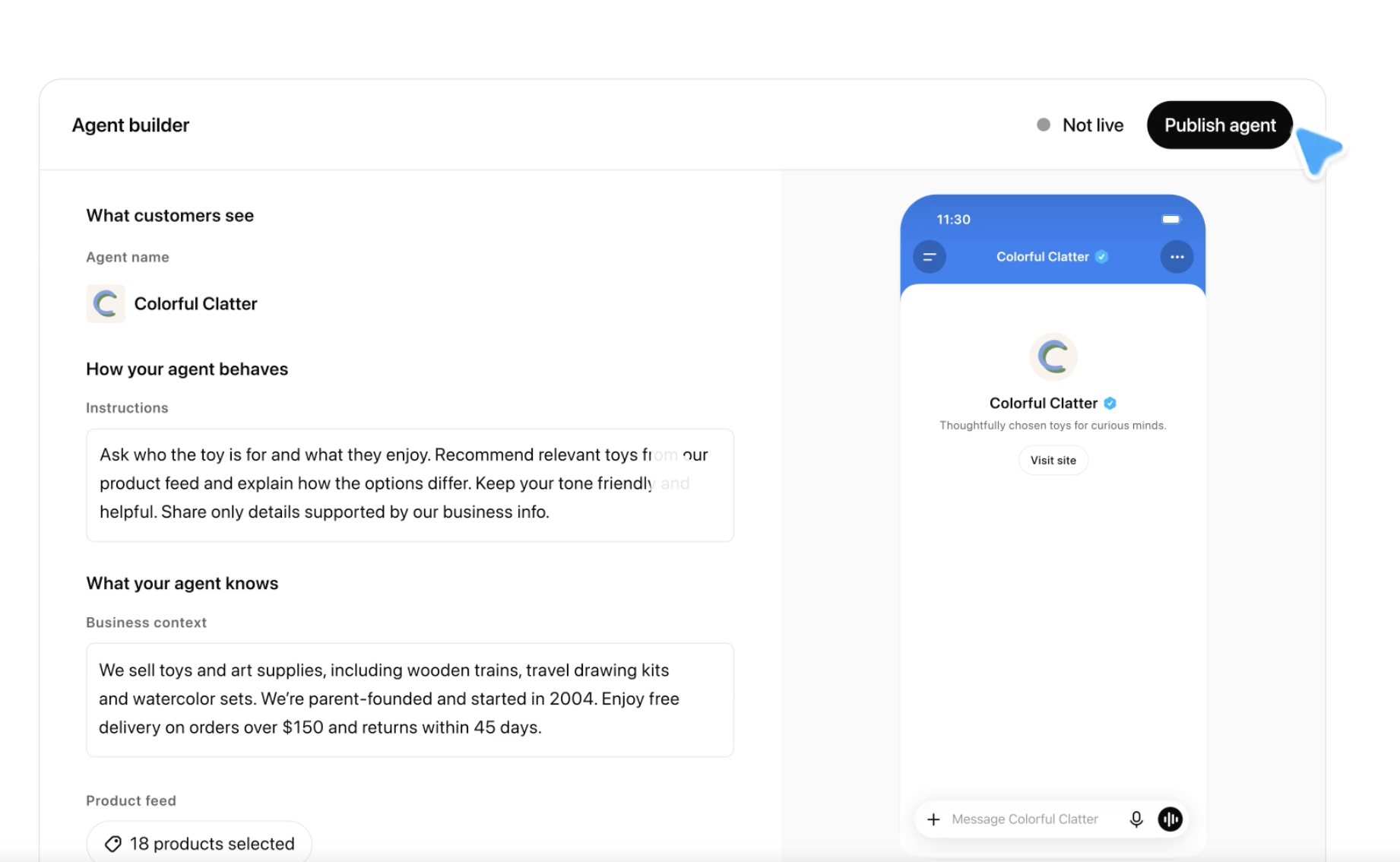 Image: OpenAI's Businesses in ChatGPT demo (a sample store, not real data).
What Business Hub shows a brand
OpenAI lists three kinds of insight, all aggregated:
- the number of mentions your business receives,
- the number of website clicks,
- discovery topics: common themes across conversations where your website is cited.
OpenAI doesn't share conversations or Business Agent chats with businesses, and insights appear only once there are enough conversations or interactions to meet its thresholds. A smaller brand may see little until volume builds.
In OpenAI's demo screens, discovery topics are broad themes with a share of the last 30 days ("Gifts for kids", "Other topics"). A theme with a percentage tells you what people were talking about when your site was cited. It doesn't name the question, who else was recommended, or whether anyone bought.
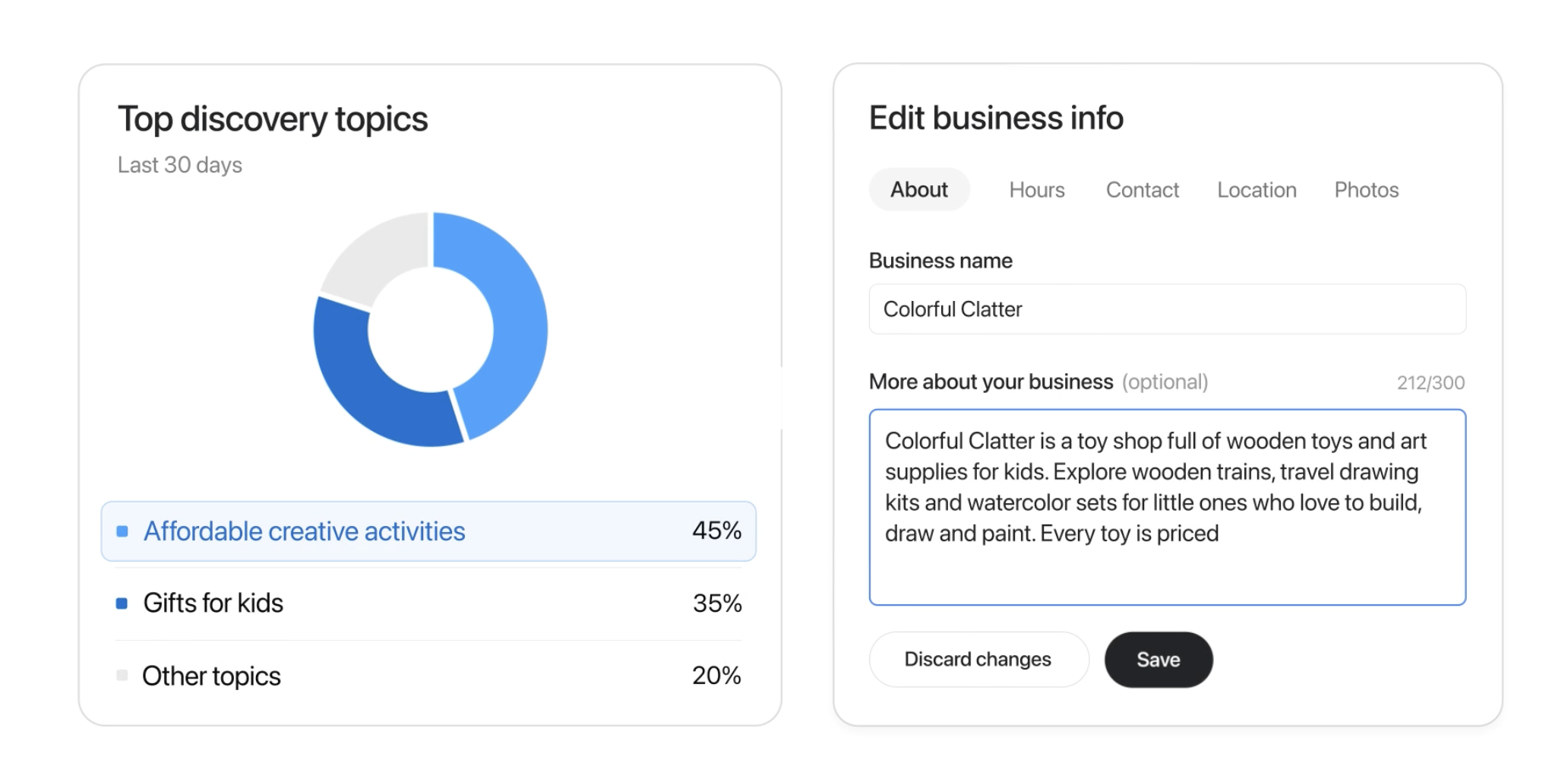 Image: OpenAI's Businesses in ChatGPT demo (a sample store, not real data).
What OpenAI's list leaves out
Every one of those numbers starts from you already showing up in ChatGPT. Mentions count the times you were named. Discovery topics come from conversations where your site was cited.
The questions that matter most are the other kind: a shopper asks which product to buy, and the answer names three competitors and not you. None of the insights OpenAI lists starts from that conversation.
We see this on our own brand. One question we track is "how do I check what ChatGPT says about my brand". In Citable's answer tests over the last 30 days, on ChatGPT, Claude and Google AI Overviews, Citable was named in 0 of 21 answers. A count of our mentions can't tell us about a question where we were never mentioned.
Hub also covers ChatGPT only. Shoppers who ask Google's AI Overviews, Gemini or Claude the same question are outside it.
The agent sits behind the mention
OpenAI describes how a shopper reaches a Business Agent: "When a business appears in a model response, people can click to see the business's ChatGPT profile. If a Business Agent is available, customers can choose to start a conversation with the business…"
In the route OpenAI describes, the way to your agent runs through being named first. The other route is paid: OpenAI says businesses can sponsor their Business Agent and use it as the destination for ChatGPT Ads, with sponsored placements clearly labeled and separate from ChatGPT's responses. (Our ChatGPT Ads setup FAQ covers budgets and eligibility.)
What to set up this week
- Claim your business in Business Hub at chatgpt.com/business-hub. On Shopify, connect the store from Business Hub or the Shopify admin to make verification simpler.
- Fill in your details and your product feed, with current pricing and availability. The "More about your business" field takes 300 characters, so write the one paragraph you'd want ChatGPT to have about you. Treat it like your product pages: if it's out of date, that's what you've handed ChatGPT.
- If you're a US ecommerce or online service business, read the Business Agents policy before building one. It's short and specific. The agent must say it's AI representing you, must not invent prices, availability, reviews, guarantees or results, and must not pressure people or create false urgency. OpenAI also says verification alone doesn't guarantee an agent will be approved. In the builder OpenAI showed, you write the agent's instructions and business context and pick which products from your feed it can use, and it stays "Not live" until you publish it.
- Decide whether a sponsored agent belongs in your ChatGPT Ads test, as a destination next to your product pages.
- List the buying questions where you aren't named. None of the Hub insights OpenAI describes is this list. Write down the 20 or so questions your customers are likely to ask before they buy, ask them in ChatGPT and the other assistants, and note who gets named and which pages are cited.
How Citable helps
Citable helps consumer brands find new customers through AI-driven discovery and marketing, in categories where shoppers research before they buy. It is built as an incremental growth channel alongside a brand's existing plans. Citable works out the questions the brand's buyers are likely to ask AI and where the answers name a competitor instead. On the Grow and Scale plans, each lost question becomes a campaign across the brand's own pages, and Citable's team can also build and run ChatGPT Ads campaigns as a service. On those plans, the brand sets the customer-acquisition targets and budget and approves each change, and Citable handles most of the setup and the execution, so the team doesn't take on another project. For Shopify stores that connect their store, Citable shows AI-referred orders. Brands can start with a free AI audit, no card needed.
Written by
Citable Team
The Citable Blog
Insights from the Citable team on AI search, and how brands get cited by AI.
Follow the agentic commerce frontier
New signals on how AI picks what shoppers buy, sent to your inbox.
More from Citable
What are ChatGPT's Sponsored Agents, and what do they mean for consumer brands?
OpenAI is testing ChatGPT ads that open a conversation with a brand's own agent. For consumer brands selling considered products, the specs get answered in the chat. What wins the sale is the last push.
ChatGPT Ads compete for the next question, not the first one
OpenAI matches ChatGPT ads to the conversation, not to a keyword. What that means for a brand's ad groups, and how Citable plans them around the buying questions we track.
ChatGPT Ads setup FAQ: who sees ads, budgets, feeds, tracking and what's restricted
Who sees ChatGPT ads, the $25 US daily minimum, context hints, Shopify and product feeds, Pixel and Conversions API, and which categories are restricted.
How ChatGPT's ad system reads a shopper, and what it means for your store
How ChatGPT picks ads, per OpenAI: it reads the whole chat, runs apart from the answer, and can show none. What each means for your store.
Ready to Optimize for AI Search?
Discover how AI platforms perceive your brand and measure your digital citability across the web.